
How NanoNotify Works
See how NanoNotify makes it easy to send instant, personalized text notifications to your customers.
Customized to deliver exactly what your small business needs, all in a single click
Step 1
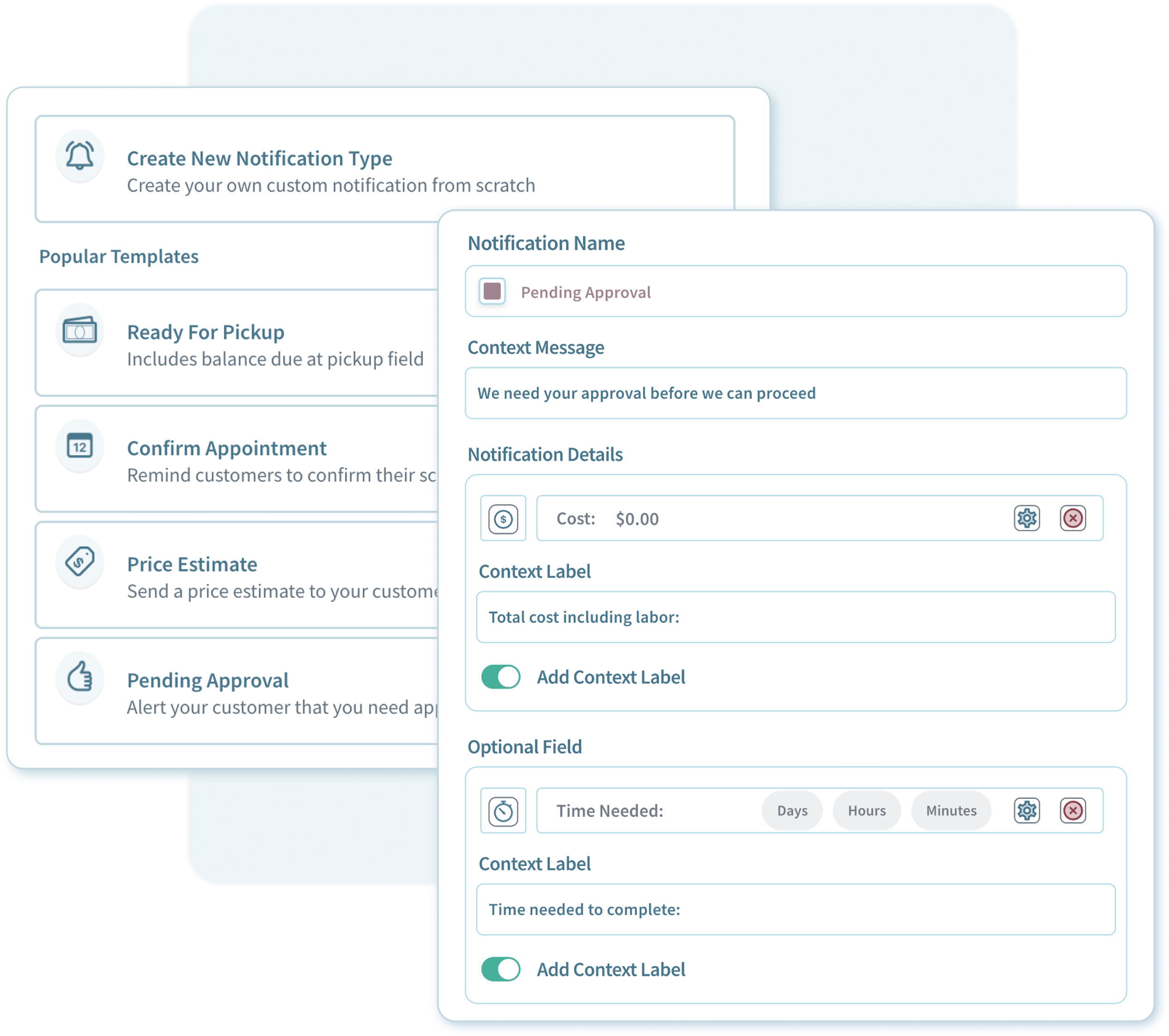
Create A Reusable Notification Type
Reusable notification types let you quickly send updates to your customers—for things like ready for pickup alerts, approval requests, or delivery updates.
Customize each type by adding different fields that go with it. Things like dollar amounts, dates or even a length of time in hours, days or weeks.
Make it stand out. Add a short message at the beginning of each type to add a little extra personalization if you need to. We’ll include it automatically.
Add optional fields for information that isn’t always needed. Or give context to each field by adding a short description if you need to.
Step 2

Send It With A Click. Anytime You Need To.
Send any of your notification types whenever you need them, instantly. Easily choose from any of your notification types and send them with a click.
Just drop in the details -like the amount due or a delivery date, hit send and we take care of the rest. Delivered to your customer instantly customer with everything it needs.
Need to add a little extra detail? Include a short custom message to that notification if it needs a little clarity and well make sure it’s included
Get peace of mind - check exactly when your notification sent and verify that it was delivered right from the dashboard.
Step 3
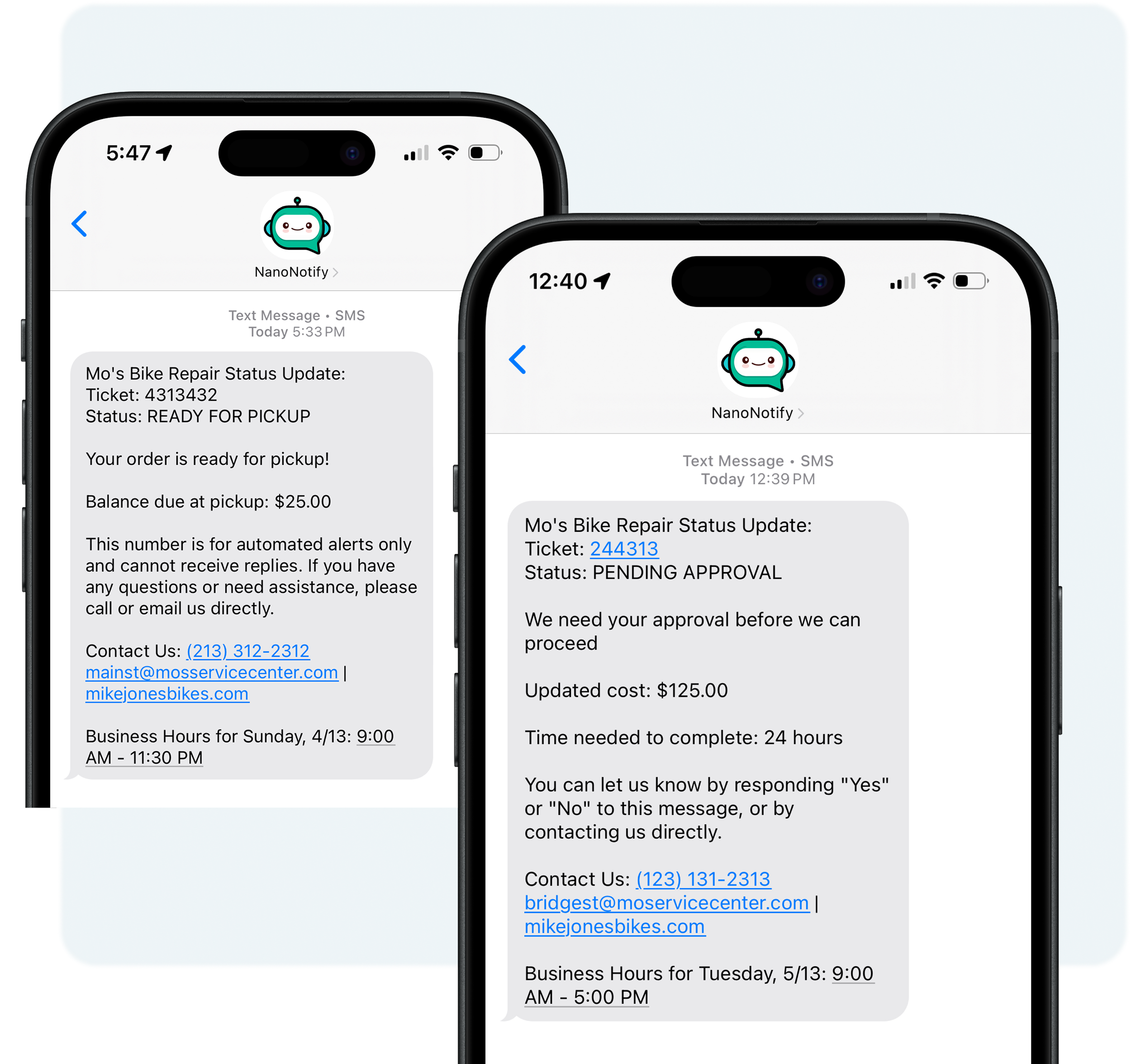
Relax. We’ve Got It From Here
Each notification automatically includes everything your customer needs to know - customized exactly the way your companies needs it. We even include your contact info if they need to reach back out
Review your notifications right from the dashboard - All of your notifications are a click away right from the dashboard. Complete with every detail that was sent to your customer
No More “What Are Your Hours?” We include your business hours for the day automatically in every notification. Problem Solved.
Instantly send updates. Create happier customers.
“NanoNotify has been a serious game changer for us. Now we send detailed, personalized text updates to almost all of our customers right from our shop computer, and we hardly ever get follow-up questions.”
Taylor Fitzsimons
Owner, Device Doctors Phone Repair
Custom Notifications Are Just the Beginning
Discover more powerful features NanoNotify brings to your business.
FAQs
-
A notification type is like a status update your company typically sends as an update to your customers like ready for pickup, out for delivery or approval requests.
-
There are 5 customizable field types to choose from, each designed for different types of information you may need to send in your notifications.
Include whatever information you need, and we’ll take care of the formatting automatically based on the field type you select for your notification.
Currency
Use this field for quotes, prices, or balances. Numbers entered here are automatically converted to a dollar amount.For example, "Total cost: $500" or "Your current balance is $150.00."
Date
This field is for sending dates such as delivery or completion dates. Numbers are automatically formatted into a readable date.For example, "Delivery date: 12/15/2025" or "The completion date for your project is 05/10/2025."
Time
This field is used when you need to specify a time, without a date, for updates or specific time-related details.For example, "Updated: 2:30 PM." or "Your meeting is scheduled for 10:15 AM"
Date/Time
Ideal for situations requiring both date and time, such as estimated completion times or delivery schedules. Numbers entered here will be formatted as a date and time.For example, "Delivered: 12/15/2025 at 10:15 AM" or "Your estimated completion time is 05/10/2025 at 3:00 PM."
Length of Time
Perfect for specifying durations such as completion time, turnaround times, or lead times. Simply enter a number and select "minutes", "hours", or "days", and it will be automatically converted into a readable format.For example, "Time Needed: 3 hours" or "Your project will be completed in 5 days."
-
Two-way notifications are included in every plan at no additional cost!
-
Each additional user is $5.00 per month. You can add or remove users at anytime.
-
Each location is $10.00 per month for each location. Each location includes a user at no additional cost!
-
A context message is a short sentence added to the start of a notification to provide extra clarity. For example, “We need your approval before we can continue” helps make quote or approval requests more clear.
-
A context label lets you customize field names for added clarity and personalization. Instead of a generic label like “balance,” you can use “balance due at pickup” to make your notifications more specific and tailored to your business.